At a glance
A fully working BLE peripheral running on an ESP32-C3, exposing a frozen custom GATT profile with six named characteristics, MITM Passkey Display pairing, and telemetry notifications at a configurable interval. Because a physical BME280 was not available during development, the firmware uses a built-in simulated sensor — but a Sensor Override characteristic lets real readings be injected from the Android companion app over an encrypted link, validating the full stack without additional hardware. On each telemetry cycle the device runs a 245-weight pure-C MLP classifier on-device to infer the environmental class (comfortable / warm / cold / humid / danger / anomaly) and notifies the central only on class change. The Kotlin/Jetpack Compose Android app covers scan, pairing, live dashboard, device control, sensor override, and labeled CSV export. The project was built spec-first: GATT UUIDs were frozen before a line of firmware was written, every phase has explicit exit criteria, and a 25-case manual test matrix was executed in full.
Problem & goal
The goal was to build a complete embedded BLE product — from a frozen GATT spec through firmware, security, on-device inference, and a companion app — in a way that could be understood, built upon, or extended by anyone reading the repo cold. Off-the-shelf sensor projects typically skip the disciplined product-engineering steps: a documented GATT profile, explicit security requirements, test-first firmware modules, and a rationale trail for every significant decision. This project treats all of those as first-class deliverables.
Functional requirements (FR-001 through FR-015) cover the full arc: BLE advertising (FR-001), GATT server discovery (FR-002), readable and notifiable telemetry (FR-003, FR-004), writable control (FR-005), persistent configuration via NVS (FR-006, FR-007), device status (FR-008), MITM-protected pairing with bonding (FR-010), OLED display output (FR-011), Sensor Override injection (FR-012), ML Alert notifications (FR-013), Android companion app (FR-014), and anomaly detection (FR-015). The scope explicitly excludes cloud connectivity, OTA implementation, and BLE Mesh, keeping the boundary tight and the project completable.
System architecture
The system is a BLE peripheral/GATT server exchanging data with a phone-side central over a custom Environmental Node Service. The OLED is a local output surface that surfaces BLE state and telemetry without requiring a connected central.
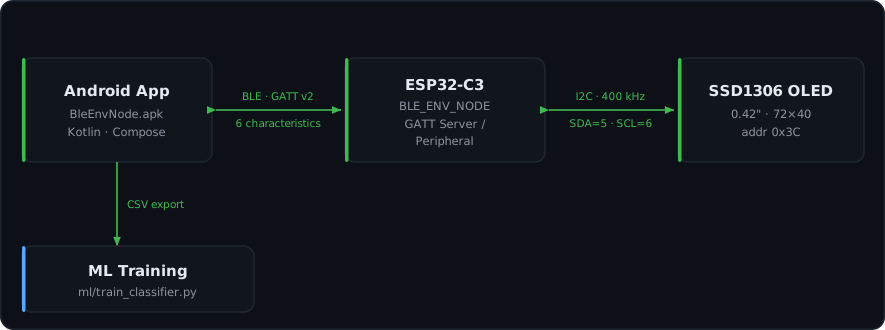 Figure: System context — the Android app talks to the ESP32-C3 over BLE/GATT (custom Environmental Node Service, 6 characteristics); the node drives an SSD1306 OLED over I2C and exports labeled CSV to the ML training pipeline.
The firmware is organized in three layers:
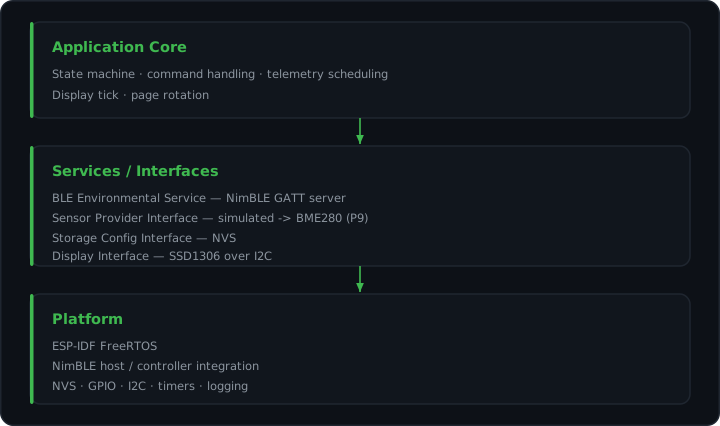 Figure: Firmware layering — the application core sits on service/interface abstractions (BLE, sensor provider with the BME280 swap point, storage, display), which sit on the ESP-IDF platform.
Five ESP-IDF components with explicit REQUIRES edges keep coupling visible: app_core (state machine, NVS config), ble_env (NimBLE GATT server, 6 characteristics), env_sensor (sensor provider with override and drift), display (SSD1306 driver and page rotator), and tinyml_inference (pure-C MLP with no internal dependencies). All components converge in main/app_main.c, which is the sole file in the main component.
The runtime state machine progresses from BOOT through INIT_NVS, INIT_SENSOR_PROVIDER, INIT_BLE_STACK, ADVERTISING, CONNECTED, and NOTIFYING, returning to ADVERTISING on disconnect. The telemetry task fires on a configurable FreeRTOS timer (default 2000 ms); display tick runs on a 50 ms timer; the NimBLE host task manages the BLE stack independently.
Hardware & software stack
MCU: ESP32-C3, RISC-V single-core, 160 MHz.
SDK: ESP-IDF v5.2.3 with NimBLE as the BLE host stack. NimBLE is the preferred choice for BLE-only applications on ESP-IDF — it avoids the Classic Bluetooth overhead of Bluedroid and integrates cleanly with FreeRTOS.
Display: 0.42” SSD1306 OLED on I2C (SDA=GPIO5, SCL=GPIO6, address 0x3C). The 72×40 visible region sits inside the SSD1306’s 128×64 framebuffer with a 28-column X-offset; without this offset content renders into off-panel memory. The display runs at I2C 400 kHz with a page render time under 5 ms.
Android app: Kotlin 1.9, Jetpack Compose BOM 2024.04, minimum SDK 26 (Android 8.0). BLE operations are managed through a BleRepository + BleViewModel MVVM split; UUID constants live in GattUuids.kt; six Compose screens cover all device functions; labeled CSV export uses the MediaStore API on Android 10+.
Binary: 0x95d60 bytes, approximately 59% of the 1 MB flash.
Key design decisions
ESP32-C3 chosen for availability, not optimality. The ESP32-C3 was used because it was available and familiar. A production-grade BLE peripheral would use the nRF52840 or nRF5340 — purpose-built for BLE with a dedicated radio co-processor, ARM TrustZone security, and significantly lower current draw in sleep. The ESP32-C3 runs at 160 MHz with an active current of approximately 80 mA, which is high for a coin-cell or battery-constrained application. For a prototype or connected-home device on USB power this is fine. The OLED panel (~5–10 mA active) is the single largest controllable load during bench development. Advertising is set to 250 ms (halved radio duty cycle from the NimBLE default of ~100 ms) while keeping discovery under 1 second.
Simulated sensor with Sensor Override as a real-sensor stand-in. The physical BME280 was not available during development. The firmware uses a near-constant simulation (approximately 24.5°C / 52% RH / 1013 hPa with sub-degree variation) and flags all samples with BLE_ENV_FLAG_SIMULATED_DATA = 1. Rather than blocking on hardware, the Sensor Override characteristic (b7e00006) allows real readings to be written from the Android app over an encrypted link — the firmware accepts them immediately and uses those values for TinyML classification and telemetry. The SIM badge on the OLED and in telemetry flags remains set because only a real on-board BME280/BMP280 driver can clear it, which is deliberate: the flag accurately represents what the firmware is doing.
Frozen GATT UUIDs and spec-first implementation. The custom 128-bit UUID namespace b7e00000-4f4a-4c2a-8b7d-2f6a6c000000 was frozen before implementation began. Characteristics b7e00002 through b7e00007 and all 0x2901 User Description descriptors are locked — no changes without explicit approval. This prevents silent contract mutation mid-implementation and ensures nRF Connect can discover human-readable characteristic names.
Pure-C MLP instead of TFLite Micro. tensorflow/lite-micro is not available in the ESP-IDF v5.2.3 component registry. The model is architecturally tiny — 3→16→8→5 MLP with 245 weights and biases, embedded as static const float arrays in ml_weights.h (~980 bytes). The forward pass is 70 lines of pure C with no external dependencies, no C++ toolchain, and no schema version mismatches. The binary footprint increase from the baseline was +3 KB.
MITM Passkey Display pairing. After Phase 8 debugging (see Debugging challenges), the security model was upgraded from Just Works to BLE_HS_IO_DISPLAY_ONLY with sm_mitm = 1 and sm_sc = 1. The OLED shows a random 6-digit passkey during first pairing; the Android app prompts the user to type it. Subsequent reconnects use the stored LTK silently — ble_gap_security_initiate() is skipped for already-bonded peers, with Android detecting Insufficient Authentication on the first CCCD write and re-encrypting via the stored LTK.
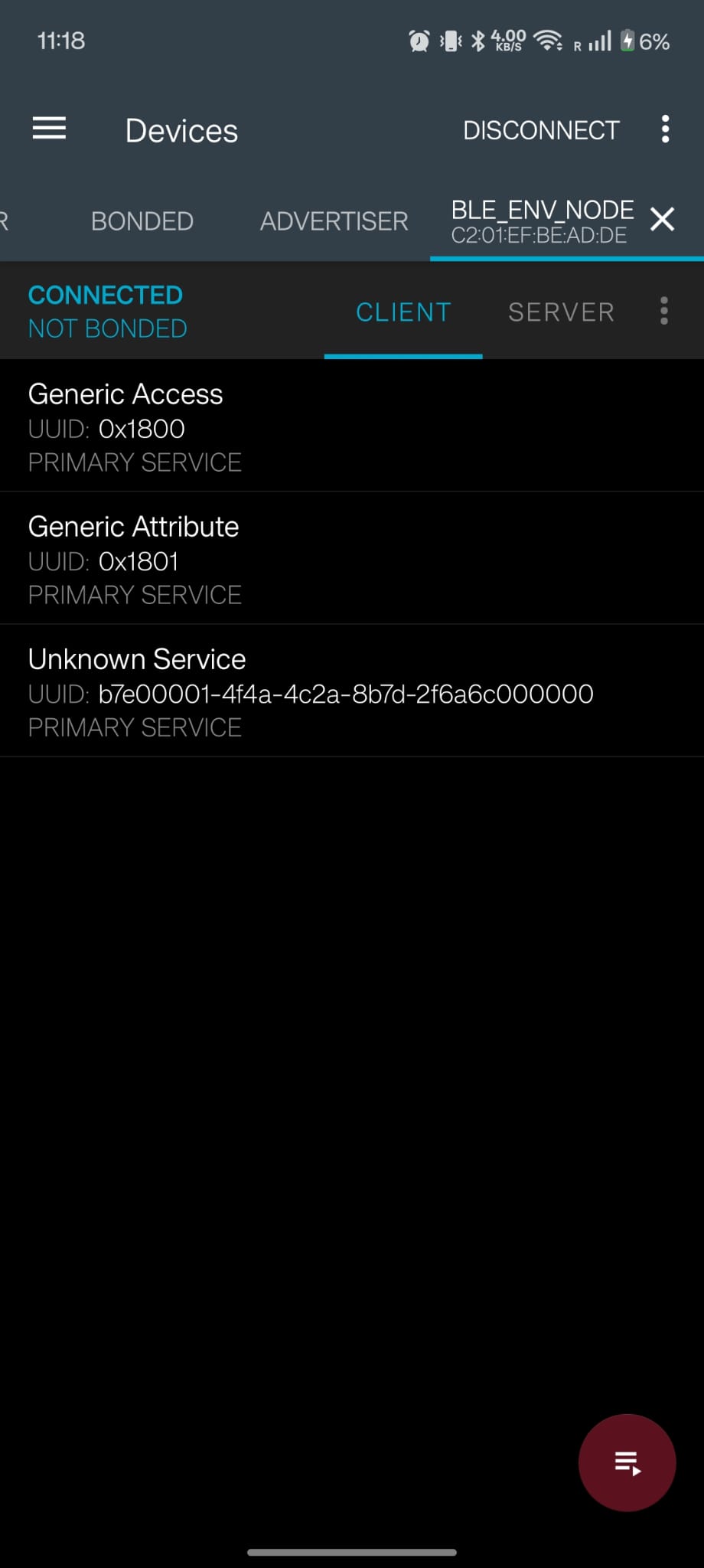 Figure: Custom GATT profile discovered in nRF Connect.
Notable engineering
Custom GATT profile
The Environmental Node Service (UUID b7e00001-4f4a-4c2a-8b7d-2f6a6c000000) exposes six characteristics:
- Telemetry (
b7e00002) — Read + Notify, open. A 16-byte little-endian frame: version (uint8), flags (uint8, bit 0 = sensor valid, bit 1 = simulated data, bit 2 = low battery), sequence (uint16), uptime_ms (uint32), temperature_c×100 (int16), humidity_pct×100 (uint16), pressure_pa (uint32). Notifications fire at the configured interval (500 ms–60 s, default 2 s). - Control (
b7e00003) — Write (encrypted). Opcodes: LED off/on/toggle (0x01–0x03), force immediate sample (0x10), set power mode (0x20, values: active/light-sleep/deep-sleep), set display power (0x30, values: off/on/dim). - Configuration (
b7e00004) — Read + Write (both encrypted). Carries report interval and boot flags (including display-off preference). Persisted to NVS. - Status (
b7e00005) — Read + Notify, open. 6 bytes: app state, last error, connected, subscribed, LED state, sensor valid. - Sensor Override (
b7e00006) — Write (encrypted). 6-byte little-endian payload: temperature int16 (°C×100), humidity uint16 (%×100), pressure uint16 (hPa×10). Writing all-zeros restores the built-in simulation. - ML Alert (
b7e00007) — Notify only, open. 2 bytes: class ID (0=comfortable, 1=warm, 2=cold, 3=humid, 4=danger, 5=anomaly) and confidence (0–100). Notification sent only on class change.
Every characteristic has a Characteristic User Description descriptor (0x2901) with a human-readable name. nRF Connect displays these names instead of “Unknown Characteristic”, which made manual testing dramatically faster. The descriptor strings are stored in flash and served via gatt_user_desc_cb() in ble_env_service.c.
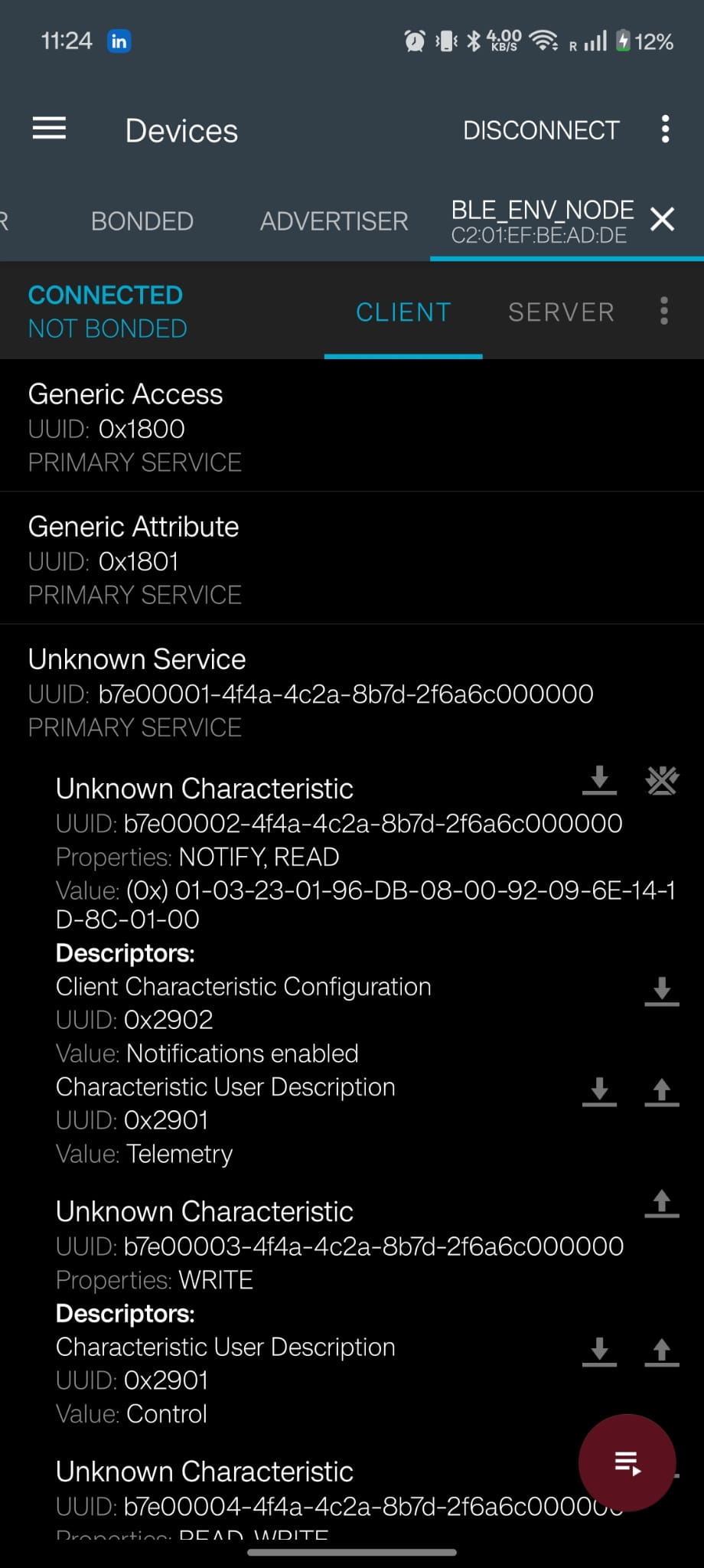 Figure: Live telemetry delivered via GATT notifications.
On-device TinyML
The TinyML component classifies the current environmental reading into five classes (comfortable, warm, cold, humid, danger) or flags anomaly, running fully on the ESP32-C3 with no network round-trip.
The model is a 3→16→8→5 MLP: inputs are normalized temperature, humidity, and pressure (min-max scaling with ranges matching the GATT Sensor Override sliders: temp −10–60°C, humidity 0–100%, pressure 900–1100 hPa); two hidden layers with ReLU activation; a 5-class softmax output. All 245 weights are compiled into ml_weights.h as static const float arrays. The forward pass — dense(), relu(), softmax(), tinyml_infer() — is 70 lines of pure C in tinyml_inference.c with no external dependencies.
Anomaly detection uses a confidence threshold: if the maximum softmax probability is below 0.50, the device returns ML_CLASS_ANOMALY (5) with confidence = (1 − max_prob) × 100. This is correct by construction — a clearly in-class input (e.g., 55°C → danger, softmax → ~0.99) never triggers anomaly; a genuinely ambiguous input at a class boundary does. An earlier approach using a separate 3→8→3 autoencoder trained on comfortable-only data was discarded because it flagged all non-comfortable readings as anomalous, including well-defined danger readings (DD-019).
The training pipeline (ml/collect_synthetic.py → ml/train_classifier.py → ml/extract_weights.py) generates 1500 synthetic samples across the five classes, trains the MLP (reported accuracy: 98.83% on the synthetic test set), and exports the weights to ml_weights.h. The accuracy number measures box-separability of synthetic data; real-sensor accuracy is unknown until the classifier is retrained on BME280/SHT31 readings.
The inference runs on every telemetry cycle (default 2 s). A BLE notification is sent on b7e00007 only when the class changes, keeping BLE traffic minimal.
The Sensor Override data flow feeds directly into inference: a slider write on the Android Sensor screen is encoded as a 6-byte payload, written to b7e00006 over an encrypted link, accepted by gatt_access_cb, and passed to sensor_provider_set_override(). On the next telemetry cycle sensor_provider_read() returns the override value plus time-based drift (±2°C / ±2% RH / ±2 hPa cycling every 5 seconds) — forcing the classifier to learn class regions rather than point values, and making the dashboard display animate naturally during demos.
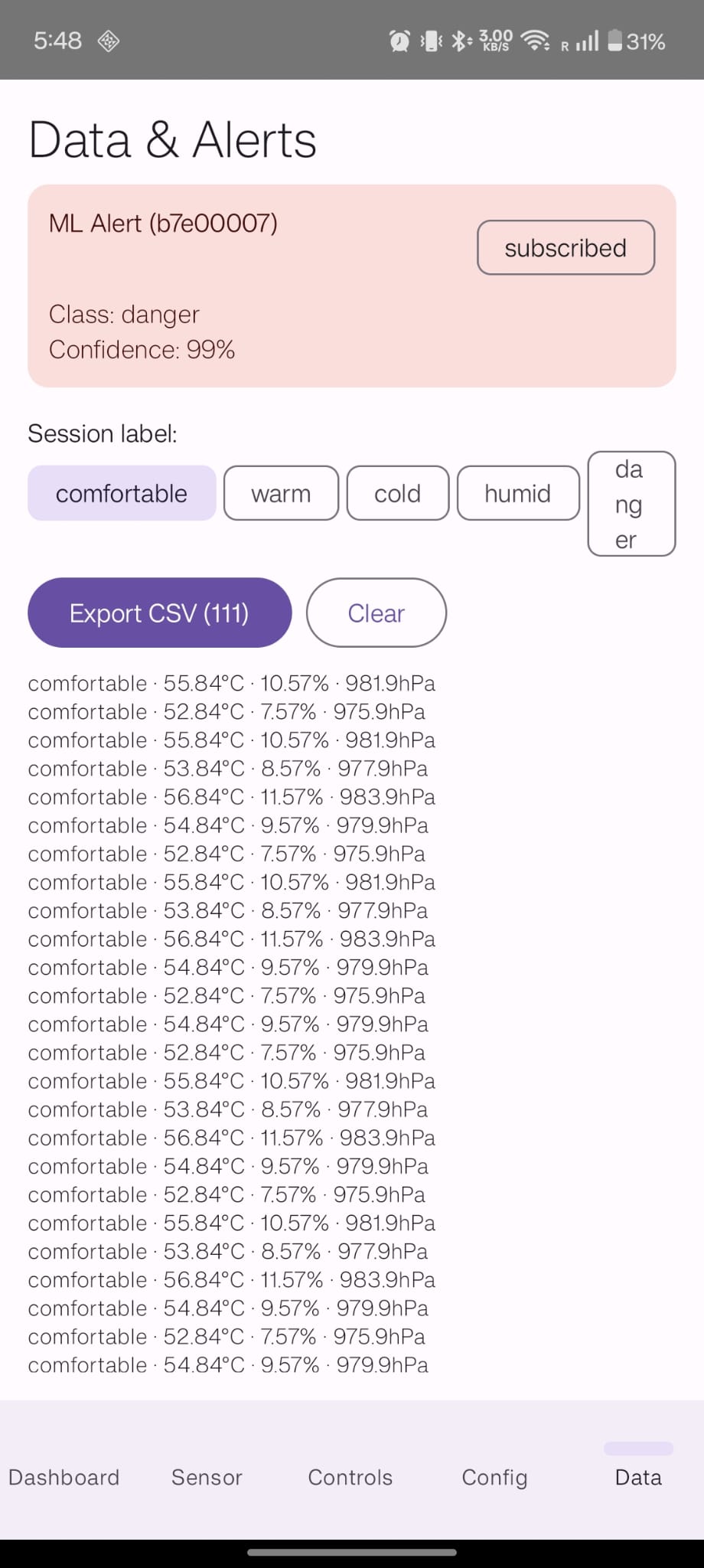 Figure: TinyML classification surfaced as alerts in the companion app.
Android companion app
The Kotlin/Jetpack Compose companion app provides full device access from a phone. BleRepository.kt owns all raw BLE operations — scan, connect, GATT operations, CCCD write queue, and lastDevice for reconnect. BleViewModel.kt bridges to the UI via StateFlow exposures and command functions. Six Compose screens handle every device function:
- Scan — lists discovered
BLE_ENV_NODEdevices; connect on tap. - Dashboard — live telemetry (temperature, humidity, pressure, uptime, sequence) and bond/encryption status indicator.
- Sensor — sliders for temperature (−10–60°C), humidity (0–100%), pressure (900–1100 hPa) that write to the Sensor Override characteristic. Slider values persist across tab navigation within the session.
- Controls — LED on/off/toggle, display on/off/dim, power mode, and force-sample commands via the Control characteristic.
- Config — reads current configuration and writes new report interval and boot flags.
- Data & Alerts — ML Alert subscription, current class and confidence, session label chips, telemetry history (last 50 entries displayed), and CSV export to the Android Downloads folder via MediaStore.
MITM Passkey Display pairing is handled natively: on first connect the OLED shows a 6-digit passkey, Android shows a PIN entry dialog, encryption establishes once the passkeys match. Subsequent reconnects use the stored LTK without a passkey prompt.
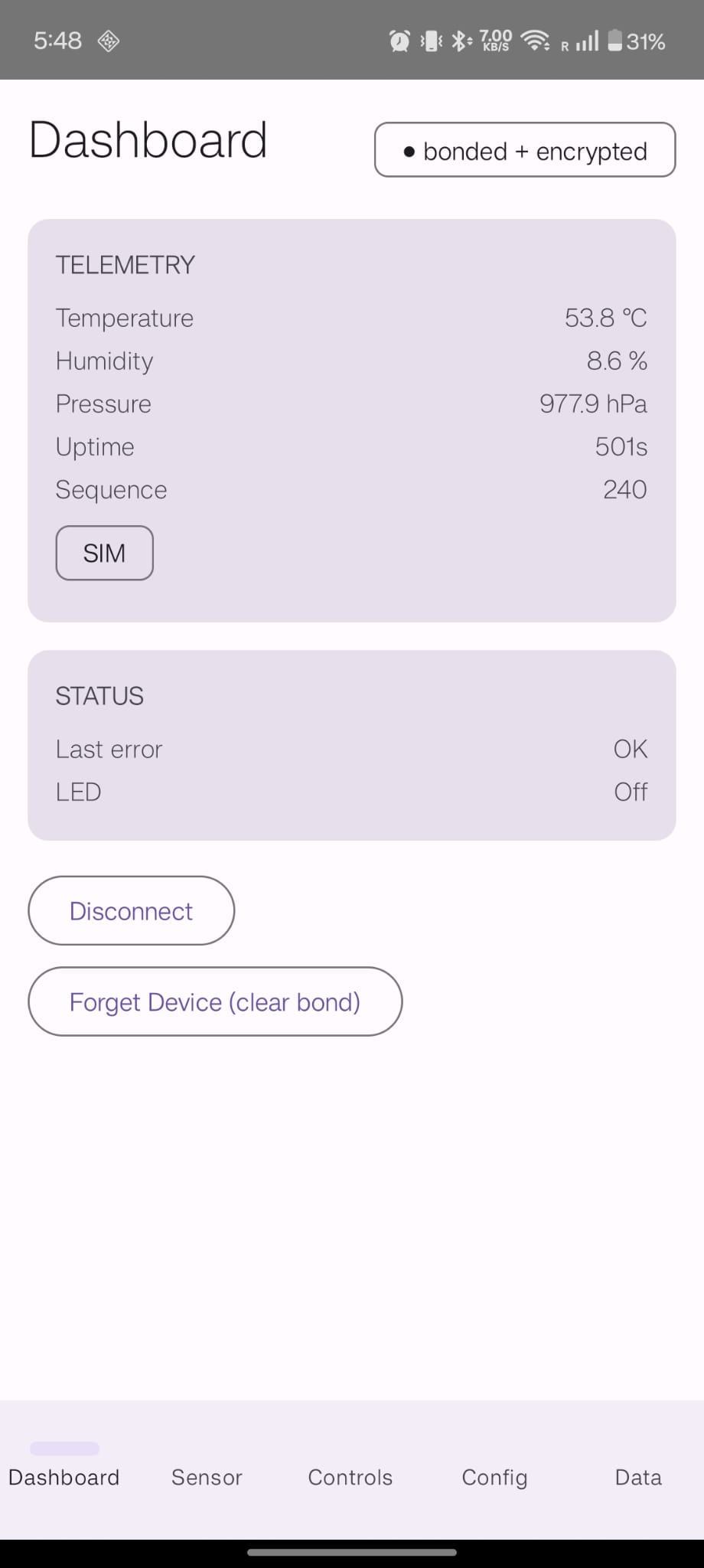 Figure: Companion app dashboard showing live telemetry.
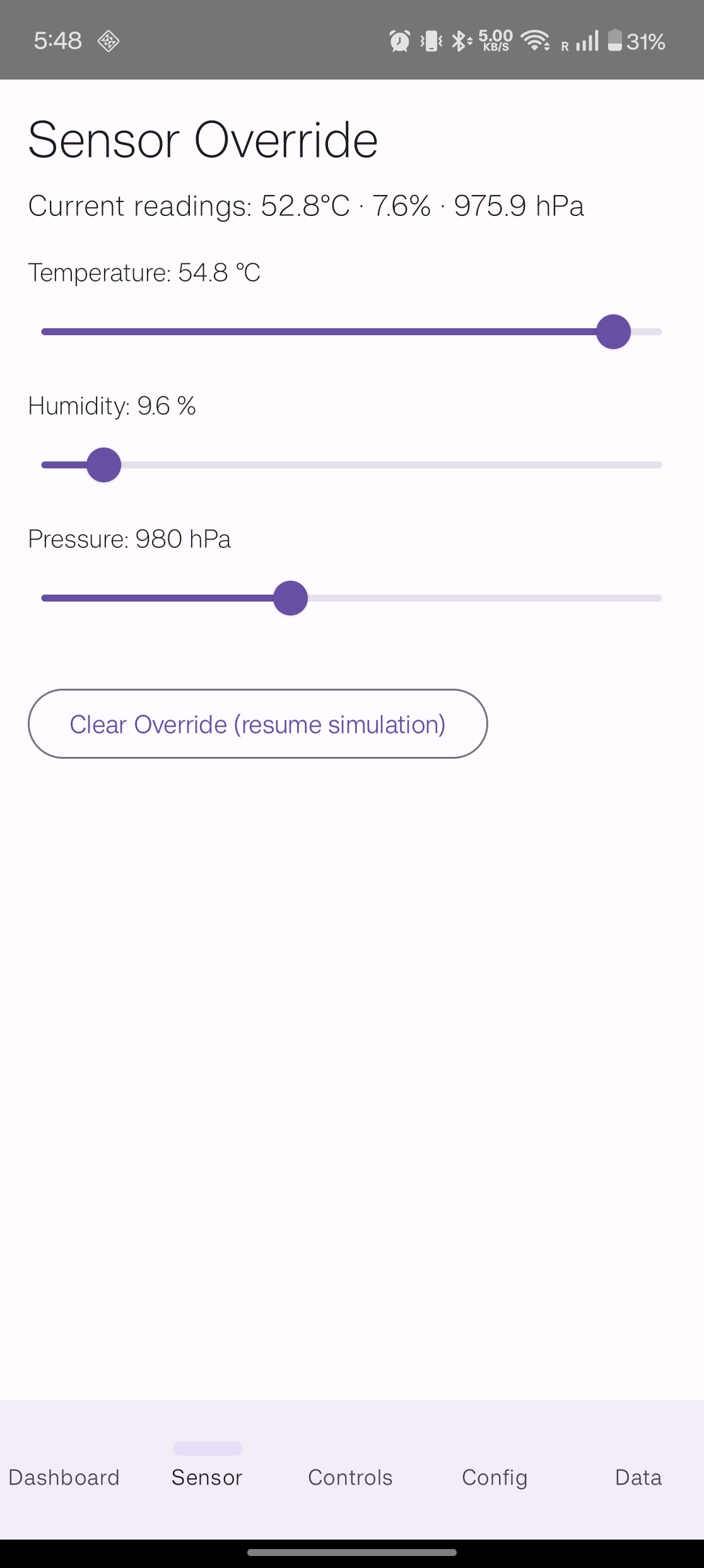 Figure: Injecting real readings via the Sensor Override screen.
Rapid BLE Bring-Up and I2C Sensor Validation
This project began as a focused two-week BLE learning sprint. I learned BLE fundamentals, implemented a custom GATT-based environmental sensor node on ESP32-C3 using ESP-IDF and NimBLE, documented the architecture, and prepared a working demo with OLED display feedback.
During a live hardware integration exercise, I extended the project from simulated temperature values to a real I2C temperature sensor. The firmware integration path was correct, but the first sensor did not respond during I2C address discovery.
I debugged the issue systematically instead of assuming a code problem. I verified the wiring and electrical connections with a multimeter, scanned the full valid I2C address range, and tested the address-select line in multiple configurations: pulled high, floating, and connected to ground. The sensor still did not acknowledge on the bus.
After receiving a replacement sensor, I configured the address-select line to 3.3V, repeated the integration, and the new sensor responded correctly. I completed the firmware integration and demonstrated live temperature readings flowing from the I2C sensor into the BLE data path.
I also independently configured an unfamiliar logic analyzer, installed the required software, connected the probes, captured I2C transactions, and identified where the temperature data was transferred on the bus.
This exercise validated my ability to learn quickly, integrate real hardware under pressure, debug firmware-versus-hardware issues systematically, and use unfamiliar lab tools independently.
Debugging challenges
Phase 8 — 18 consecutive pairing failures. The most expensive debugging episode in the project. Every attempt produced “Incorrect PIN or pairing code. Failed to connect to BLE_ENV_NODE” on Android 16, with zero NimBLE SM events in the serial log on most attempts. The symptom pointed at SM configuration (IO capability, MITM flag, SC flag), so 17 attempts cycled through those variables — none fixed it.
Two bugs were both required, and the first made the second invisible:
-
ble_store_config_init()was never called. This function wiresstore_read_cb,store_write_cb, andstore_delete_cbintoble_hs_cfg. Without it,store_write_cbisNULLand the Security Manager silently aborts at the LTK-save step before any SM PDU is exchanged.CONFIG_BT_NIMBLE_NVS_PERSIST=yin sdkconfig is necessary but not sufficient — the NVS callbacks must be registered explicitly. The ESPbleprphreference example calls it; the project did not. -
NimBLE host task stack too small for SC ECDH. The default
CONFIG_BT_NIMBLE_HOST_TASK_STACK_SIZEis 4096 bytes. Secure Connections pairing performs ECDH point-multiplication that consumes approximately 6–7 KB of stack depth; the task overflowed mid-pairing. Fixed by settingCONFIG_BT_NIMBLE_HOST_TASK_STACK_SIZE=8192.
Bug 1 suppressed all SM log output; Bug 2 only surfaced at attempt 18 when the store layer was finally registered and the first SM exchange completed far enough to overflow the stack. The resolution came from flashing the bleprph reference example, confirming it paired successfully on the same hardware, then diffing the two projects line-by-line. The diff revealed the single missing ble_store_config_init() call.
Two additional findings from Phase 8 are now permanent decisions: ble_gap_update_params() was removed from the CONNECT handler because immediately requesting a connection parameter update raced with Android 16’s SMP initiation (at attempt 8 the device connected at 15280 ms and disconnected at 18580 ms — only 3.3 seconds, racing the supervision timeout). A Security Request timer (ble_sm_slave_initiate() 500 ms after connect) was also tried and rejected: at attempt 17 it left a pending SEC_REQ procedure in flight that blocked ble_sm_pair_exec from creating a PAIR procedure when Android’s Pairing Request arrived, producing Pairing_Failed(0x08) 30 ms later with no Pairing Response.
Bonded device re-pairing on reconnect. After the Phase 8 fix, a separate issue caused already-bonded peers to re-pair on every reconnect. Root cause: ble_gap_security_initiate() was called unconditionally on every BLE_GAP_EVENT_CONNECT. Android 16 responds to an unsolicited Security Request from a bonded peripheral by initiating fresh pairing rather than re-encrypting with the stored LTK. Fix: check ble_store_read_peer_sec() before calling ble_gap_security_initiate() — only call it for unknown peers.
Advertising payload overflow. The device was not visible in nRF Connect scan after initial firmware. Root cause: the advertising payload packed Flags (3 bytes) + Complete Local Name “BLE_ENV_NODE” (14 bytes) + 128-bit Service UUID (19 bytes) = 36 bytes, five bytes over the 31-byte BLE limit. ble_gap_adv_set_fields() returned an error that was not checked, so advertising “started” with an empty payload. Fixed by splitting across advertisement data (Flags + name = 17 bytes) and scan response (UUID128 = 19 bytes), with error-checking on both calls.
Unity test silent dedupe. The on-target test suite appeared healthy at 37 Tests 0 Failures 1 Ignored / OK but 25 of 62 written tests were silently dropped. Four test component directories shared the basename test/; ESP-IDF derives a component name from its directory basename and silently kept only the last entry in EXTRA_COMPONENT_DIRS when names collided. Fix: renamed to unique basenames (test_app_core/, test_ble_env/, test_env_sensor/, test_display/). The count jumped to 62 Tests 0 Failures 1 Ignored / OK.
Validation strategy
On-target Unity suite. Pure-logic modules — encoders, validators, state setters, storage parsing, display formatters — were developed test-first using ESP-IDF Unity, running on the ESP32-C3 via a firmware/test_app/ unit-test-app project. Result: 62 Tests / 0 Failures / 1 Ignored. NimBLE callbacks and the SSD1306 register sequence are not covered by Unity — they are manually verified. Running on-target rather than on a host ensures host/target ABI parity (size_t width, endianness).
Manual test matrix. tests/manual_test_matrix.md documents 25 test cases (TC-001–TC-012, TC-D01–TC-D06, TC-SEC-01 through TC-SEC-06, TC-AND-01) with Pass/Not-run status. Result: 24 Pass, 1 Obsolete (TC-SEC-02 made obsolete after DD-020 replaced Just Works with MITM Passkey Display). The matrix covers BLE advertising and connection, telemetry read and notification, control writes, OLED display behaviour, security pairing and bonding, and Android app integration.
nRF Connect verification. The custom GATT profile, User Description descriptor names, telemetry notifications, and pairing behaviour were all verified in nRF Connect before the Android app was written. Screenshots of the GATT service and live telemetry notifications are included in the repository.
Status & roadmap
The project shipped as v1.0.0: a working prototype on ESP32-C3 with simulated sensor + override, all six GATT characteristics, MITM Passkey Display pairing and bonding, OLED output, TinyML classification, and the Kotlin/Compose Android companion app. All Unity unit tests pass on-target; the manual test matrix is 24/25 Pass (1 Obsolete). The SIM badge is visible on the OLED and in telemetry flags because all readings originate from the simulated sensor.
Next milestone — v1.2.0: Real sensor integration. Wire a BME280 or SHT31 to the existing I2C bus (SDA=GPIO5, SCL=GPIO6) and implement sensor_provider_bme280.c behind the existing sensor_provider.h interface. Because the swap point is already in env_sensor, no GATT or Android app changes are needed. The SIM badge clears automatically once real data flows through BLE_ENV_FLAG_SIMULATED_DATA. The TinyML classifier will need retraining on real-sensor data to replace the synthetic training set — the 98.83% accuracy figure measures box-separability of synthetic data, not real-sensor skill.
Further out: Secure OTA firmware update; Battery Service (0x180F) and Device Information Service (0x180A); numeric-comparison pairing (BLE_HS_IO_DISPLAY_YES_NO) as an alternative to the current Passkey Display flow; nRF52840 port for significantly lower power consumption.
What I learned
Systematic debugging over speculative editing. The pairing bug took 18 attempts and spread across SM configuration flags, address types, Security Request timing, and connection parameter negotiation before the root cause was found in a completely different layer — a missing ble_store_config_init() call. The resolution came from a single discipline: flash the vendor’s bleprph reference example, confirm it works on the same hardware, then diff against our code line by line. The fix was one call the diff exposed in minutes that direct reasoning missed across seventeen attempts. The method — reproduce deterministically, isolate one layer, test the reference, diff, change one thing — is the most transferable skill in this project.
Documentation rots silently. After the firmware ran, an independent review found that the repo had quietly drifted out of agreement with itself: the security model was described as “Just Works” in roughly ten places after it had been upgraded to MITM Passkey Display; the OLED layout spec described a page arrangement the firmware had changed; the README cited test counts and binary sizes that no longer matched the actual artifacts. None of this caused a runtime failure — it just made the repo unreliable as documentation. The fix was nominating one source of truth for each fact and making every other mention link to it instead of restating it.
Numbers need evidence, not inference. The claim “62 tests pass” was inferred from CMake SRCS lists before it was ever observed on hardware. The on-target run showed 37. compiles ≠ runs; a list in a build file is not evidence of execution. The same discipline applies to binary size, accuracy figures, and timing estimates — they require re-measurement against the real artifact whenever the code changes.
Dead code misleads. TFLite Micro artifacts (model_data.cc, .tflite files, quantization scripts) remained in the repository after the pure-C MLP approach was adopted. They looked like the deployment pipeline to any reader. Deleting them produced a byte-identical binary — they cost zero bytes and significant comprehension. If it is not in the build, it should not be in the tree.
Wrong approach versus wrong implementation. The autoencoder anomaly detector was not a coding bug — it worked exactly as written. The design was a category error: an autoencoder trained on comfortable-only data is a novelty detector for comfortable, not a general anomaly detector. It flagged danger readings as anomalous because they were not comfortable. No debugging of the implementation would fix it; the approach had to change to classifier confidence thresholding. When repeated fixes fail to converge, the right question is whether the approach is correct, not just the code.
Security primitives have hidden dependencies. BLE_HS_IO_DISPLAY_ONLY, sm_mitm = 1, and sm_sc = 1 are not sufficient for passkey pairing to succeed on Android. Three additional fields are required: store_status_cb, sm_our_key_dist |= BLE_SM_PAIR_KEY_DIST_ENC, sm_their_key_dist |= BLE_SM_PAIR_KEY_DIST_ENC. Omitting any of them produces “Incorrect PIN or passkey” even when the correct passkey is entered. This is documented in neither the NimBLE README nor most examples — it was found only by diffing against bleprph.